
Practical Guides
Log in to saveHow to Improve Your Google Ads Quality Score
9 min read

Google Ads quality score is a diagnostic tool that shows how relevant your ads and landing page are compared to similar advertisers; it is reported on a scale of 1-10 and calculated at the keyword level. The fastest way to raise the score is not a single magic setting: first find which component is weak, then align the ad and landing page with search intent. Below, we've gathered six improvement steps you can actually apply to an account, along with what to do in each and why it works, accompanied by a numerical example.
Table of Contents
First find the low component, focus the change there
Chasing quality score blindly burns budget and time. Google evaluates the score through three components: expected click-through rate, ad relevance, and landing page experience. Start by seeing which of these three is weak.
In your account, go to the Campaigns > Keywords section and, from the columns menu, add quality score, expected CTR, ad relevance, landing page experience, and the historical values of these metrics. Then group keywords especially by the component that appears "Below average"; if you segment the table by date, you'll also catch when the change began.
This distinction matters because the solution for each low score is different. If ad relevance is low, the match between keyword and ad copy is weak. If expected CTR is low, the ad isn't persuading the searcher enough to click. If landing page experience is low, the page doesn't fulfill the message given in the ad or makes the user's task harder. Rather than randomly changing the entire campaign, focusing on the single component that will create the highest impact both saves time and makes what works measurable.
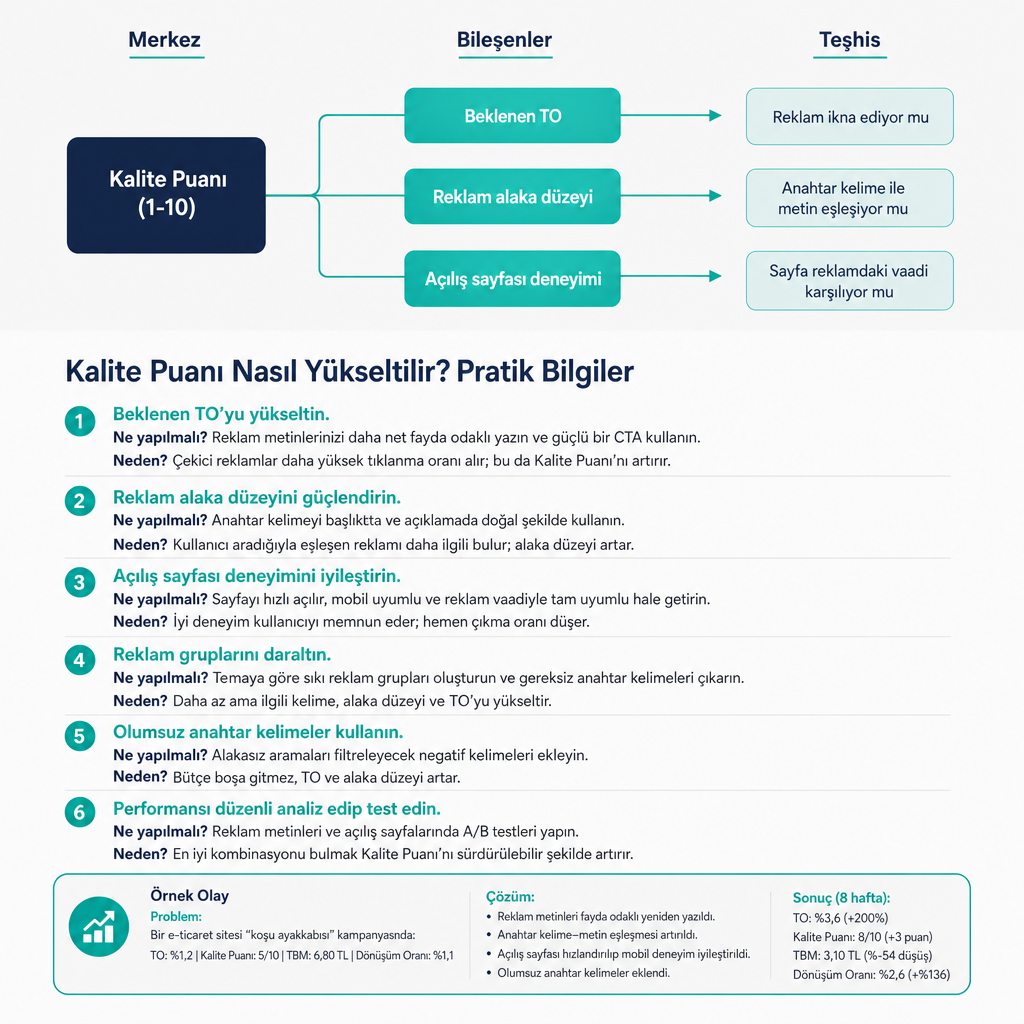
Split keywords into narrow intent clusters
Gathering many keywords that express different purposes in a single ad group necessarily generalizes the ad copy and lowers relevance to the search query. The solution is to build smaller groups based on user intent.
Consider a furniture store. Instead of keeping the phrases "buy desk," "desk prices," "small desk," "office chair," and "desk assembly" in the same group, separate them; write an ad for each group that addresses only a single need. Google also recommends splitting keywords that are too different to be easily targeted by the same ad into appropriate ad groups.
Narrower groups bring three concrete advantages: you can bring the ad headline closer to search intent, offer a clearer benefit in the description, and send the user directly to the relevant product or service page. Just one warning: opening separate, micro ad groups for each keyword just to raise the score makes management harder. Make the segmentation between intents that genuinely need a different ad message.
Match ad copy to search intent and offer
Repeating the keyword in the ad headline is not enough; you must also tell the user why they should click. Compare two ads for the search "Istanbul sofa cleaning."
The weak version only says "Sofa Cleaning Service — We provide quality service, call now" and gives no distinguishing information. The strong version, on the other hand, says "Same-Day Sofa Cleaning in Istanbul — On-site cleaning, fixed price and free inspection, book today," presenting the region, the speed advantage, price clarity, and a call to action all at once.
Use what's appropriate in the ad message: the searched product or service, delivery/service region, price advantage or free shipping, delivery time, warranty-return-appointment information, and a clear call to action. To improve expected CTR, Google recommends making the ad offer more appealing, matching ad details to keyword intent, and testing different calls to action. The critical boundary here is this: a discount or delivery promise you don't actually offer may bring clicks in the short term, but it leads to loss of conversion and trust.
Keep the promise identical between ad and landing page
The user must find on the page whatever they saw in the ad. If the ad says "delivery within 24 hours," this information must be visible on the landing page; if the ad promotes "wireless headphones," the user should land on the relevant product or category page, not a general electronics category.
A quick consistency checklist does the job:
- Is the product or service from the ad clearly featured on the page?
- Is the price, campaign, or delivery information from the ad up to date?
- Does the page's heading meet the search intent?
- Can the user reach important information without scrolling?
- Is the form, cart, or purchase button easy to find?
Google evaluates the landing page experience from exactly this angle: how relevant and useful the page is for the person who clicked the ad. The disconnect between ad and page lowers not only the quality score but also the conversion rate; when the user can't find what they're looking for, they leave and your budget goes to waste. If you're confused about which stage to monitor the metric at, our practical knowledge content explaining how to look at the right metric makes decision-making easier.
Treat mobile experience and page speed as technical work
Increasing ad clicks alone is not enough; if the user waits for the page to load or can't complete an action on mobile, spending doesn't turn into conversion. Test your landing page especially on mobile.
The things to check are clear: Does the page load fast, is the main content understandable on the first screen, are the buttons easy to tap with a finger, do pop-ups cover the content, are the images larger than necessary, are the form fields easy to fill on mobile, does the payment or quote-request process contain unnecessary steps? If needed, compress images, reduce unused scripts, simplify critical content, and don't leave the mobile design as a shrunken version of the desktop. Among Google's quality score recommendations is also improving mobile compatibility and loading speed.
Here, look not only at the quality score but also at metrics such as mobile conversion rate, page exit behavior, form start-completion rate, add-to-cart rate, and on-page engagement. This data shows faster than the score whether the technical fix actually worked.
Track conversion and profitability together, not just the score
Quality score is not a performance metric to be targeted on its own. Before and after each change, compare the quality score, expected CTR, actual CTR, conversion rate, cost per conversion, return on ad spend, and the number of qualified leads/sales.
The logic is simple: If an ad's quality score rises while its conversion rate drops, that change is not considered successful. Similarly, an increased CTR might be bringing curiosity clicks that don't produce sales. Quality score is a diagnostic tool that evaluates ad and landing page quality for specific keywords; it is not the only input of the ad auction. Ad rank is determined together with bid, ad quality, search context, and other factors. That's why your goal is not to see a 10 for every keyword, but to bring the right user to conversion at a reasonable cost. If you'd like to refresh the meaning of these metrics, our digital marketing terms glossary is a quick reference.
Numerical case study: what changed in an e-commerce campaign
Suppose the starting situation of a "wireless headphones" campaign at an e-commerce store is this: 2,400 impressions, 72 clicks, 3% CTR, 5/10 quality score, 2% conversion rate, 1,200 TL spend, and 2 sales.
The review revealed three problems. First, "headphones," "gaming headset," and "wireless headphones" were in the same ad group. Second, the ad did not clearly state wireless connectivity and free shipping. Third, clicks went to the general electronics category instead of a specific product page.
The solution applied was the exact counterpart of the steps above: keywords were split by product intent, a separate ad was written for the "wireless headphones" group, "Free Shipping" and the actual campaign advantage were added to the ad, the user was directed straight to the wireless headphones listing page, the large images on the mobile page were shrunk, and the purchase button was made visible.
| Metric | Before | After (4 weeks) |
|---|---|---|
| CTR | 3% | 5.2% |
| Quality score | 5/10 | 7/10 |
| Conversion rate | 2% | 3.6% |
| Sales with the same budget | 2 | 5 |
This table shows that the increase in quality score did not come alone; it came together with more relevant ads, a more accurate page, and a better user experience. The numbers are example values prepared to explain the method and there is no guarantee of the same result in every account. To continuously monitor your campaign performance, you can check out our free digital marketing tools.
Frequently Asked Questions
What should the Google Ads quality score be?
7 and above is generally considered a good diagnostic signal, but it is not a success criterion on its own. Conversion cost and profitability are more important; some high-intent and profitable keywords can also deliver good results with a score of 6.
Why does the quality score appear as "—"?
Google may display "—" when there is not enough exact-match search data to calculate the keyword's score. Once sufficient impressions and data accumulate, the score begins to be reported.
Does changing the match type directly raise the quality score?
No. Google states that the score is based on the keyword's historical impressions in exact-match searches; changing the match type does not change how it is calculated. The match type can affect your participation in more auctions and your data collection, but it does not automatically raise the score.
If the quality score rises, does cost per click definitely drop?
Not definitely. The quality score helps evaluate ad quality; the actual auction result changes based on bid, search context, competition, and other ad rank factors.
How often should the quality score be checked?
After new ad or page changes, allow time for data to form, then do weekly or biweekly checks. Don't make decisions based on small daily fluctuations; compare historical quality score, CTR, and conversion data together.