
Practical Guides
Log in to saveWhat is ChatGPT Ads? How to Run Ads in Turkey
12 min read

ChatGPT Ads is OpenAI's advertising platform that allows brands to display ads based on the conversational context within ChatGPT. Here's how it differs from classic search advertising: instead of matching a single keyword, it jointly evaluates the user's intent in the conversation, the ad copy, the landing page, and the context signals the advertiser adds. For a business in Türkiye looking to advertise, the practical question boils down to three headings: where the ads appear, how to open an account, and whether this channel should be used instead of Google Ads or alongside Google Ads. In this guide, we answer the question of what ChatGPT Ads is based on OpenAI's current documentation, and we address the ChatGPT advertising flow in Türkiye, the bidding logic, and the first campaign decisions one by one.
At digigund, we both explain these new types of ad channels on the training side and work alongside businesses on Google and Meta ad management; our aim in this article is to introduce you to the channel and place your campaign decisions on solid ground.
Table of Contents
What ChatGPT Ads is and where the ad appears
ChatGPT Ads is an advertising product that enables advertisers to purchase paid ad space around ChatGPT responses. The most important rule is this: the advertiser cannot change, rank, or insert ad copy into the organic response ChatGPT provides. The ad is labeled separately and distinctly from the response. Therefore, there is a common wrong answer to the question of what ChatGPT Ads is: this product is not "making ChatGPT write ad copy." The actual product here is the infrastructure for serving and measuring ads within ChatGPT.
A ChatGPT ad usually includes the advertiser name, brand logo or favicon, headline, description text, landing page, and visual creative. The ad may appear below the ChatGPT response when there is a suitable match; it is not blended into the response.
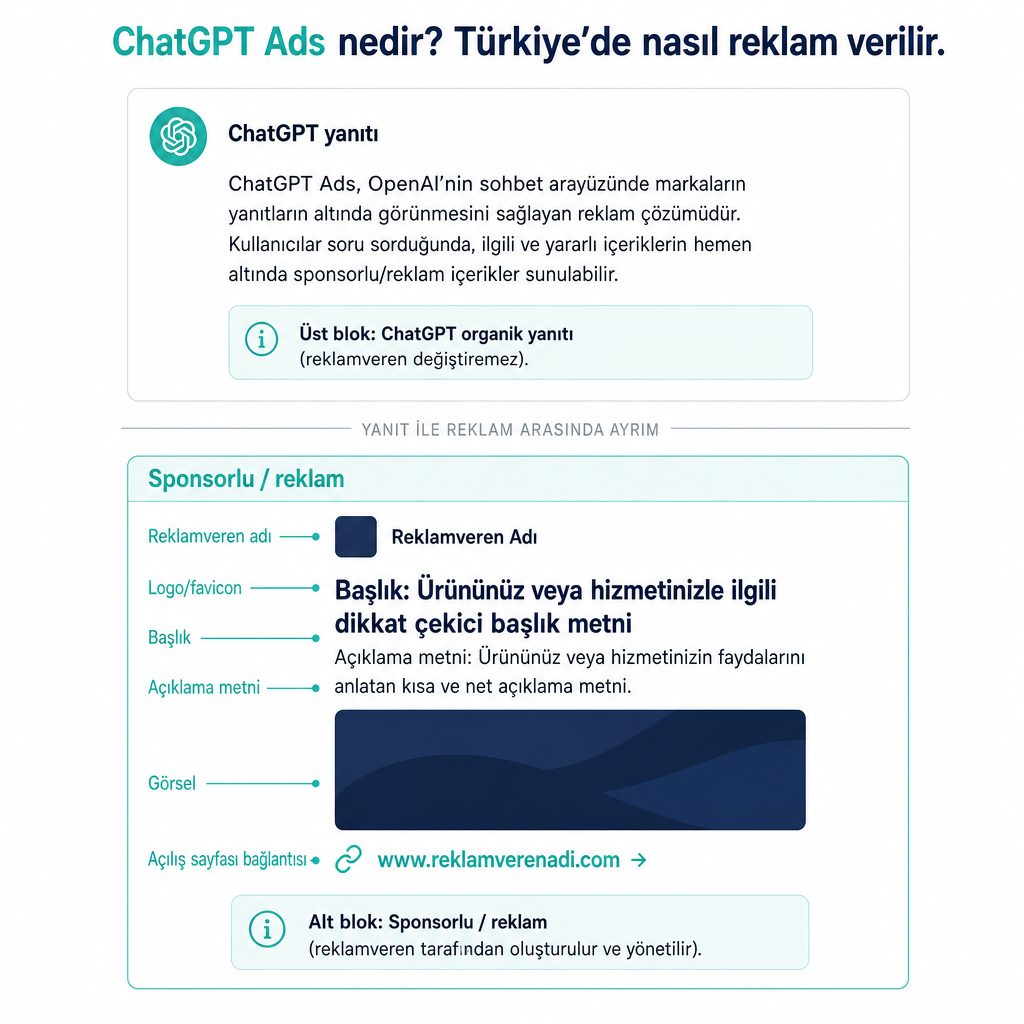
Whether the ad is shown depends not only on a single word the user types. The system may consider the topic and intent of the current conversation, the ad headline and description, the content of the landing page, the context hints added by the advertiser, and, if personalization is enabled, selected signals from the user's ChatGPT experience. The context hints added by the advertiser do not work like exact-match keywords and do not guarantee that the ad will appear in a specific conversation.
Which users ChatGPT ads are shown to
Ads are being tested on ad-supported consumer plans in eligible regions. The critical distinction here is between the user's subscription plan and the advertiser setting up a campaign: the user's plan determines the audience that sees the ad, while advertising depends on a separate Ads Manager account and an approval process.
| ChatGPT plan | General status regarding ad display |
|---|---|
| Free | Ads may be seen in eligible regions and user groups |
| Go | Ads may be seen in eligible regions and user groups |
| Plus | No ads are shown |
| Pro | No ads are shown |
| Business | No ads are shown |
| Enterprise and Edu | Evaluated separately based on account type and policy |
No ads are shown to Plus, Pro, and Business users; accounts identified as being under 18 years old are also not included in the ad audience. This is a point where you need to frame your target audience correctly when planning campaigns: your ad will predominantly reach consumers using Free and Go, and you cannot capture the paid upper segment through this channel.
ChatGPT advertising and account creation in Türkiye
The starting point for the ChatGPT advertising process from Türkiye is the OpenAI Ads Manager Beta platform at ads.openai.com. However, it is essential to check during registration whether advertiser access specific to Türkiye is active for your account. OpenAI announces that it is opening Ads Manager access to Europe, the Middle East, and North Africa; since Türkiye is not individually listed in this announcement, it would be incorrect to say either "everyone in Türkiye can definitely advertise" or "Türkiye is not supported." The right approach is to rely on the current eligibility screen within Ads Manager.
The basic flow followed when creating an account consists of the following steps: logging in or opening a new OpenAI account at ads.openai.com, using an email linked to a business account, entering the advertiser name and brand information, adding a logo or favicon, completing the billing profile and payment method, carrying out the required account verification, and proceeding to the campaign creation screen. During registration, an initial ad draft can be generated automatically by entering the business's website; if desired, this step can be skipped and you can go directly to the Ads Manager. At the billing stage, information such as business name, billing address, and billing email may be requested.
Practical note for Türkiye: If Ads Manager is not yet open for your account, still try the registration flow. OpenAI states that if access is not yet available in your country, you can create an account and submit a request to be notified when eligibility opens.
When setting up the ad account side, having your landing pages and conversion measurement ready directly determines the data you will get from the channel. If you want to clarify the basic concepts before choosing an ad channel, our guide explaining what digital marketing is for beginners and our marketing fundamentals guide that establishes the channel–goal relationship are good starting points.
How to set up your first ChatGPT Ads campaign
In your first campaign, the goal is not to enable as many settings as possible all at once; it is to clarify which user action you want to take in which conversational context. OpenAI's quick-start document summarizes the process in three stages: creating an account, setting up a campaign, and tracking performance.
Choose the campaign objective. The basic objectives in Ads Manager Beta are Views and Clicks; if proper conversion measurement is set up, conversion-focused options can also be used. Views is for visibility and reach, Clicks is for driving traffic to the landing page, and Conversions is for driving toward supported standard conversion events such as purchases or sign-ups. For a new e-commerce business, instead of just increasing the number of impressions, match the campaign objective to a business goal such as a product page visit or a purchase.
Define the ad group and context hints. At the ad group level, you add hints that describe which conversation topics your product is meaningful in. For example, a travel brand may give contexts such as "weekend travel from Türkiye to European cities," "research for affordable flight tickets," or "comparing family vacations and hotels." These are not exact keyword targeting; the user does not need to type the same sentence, the goal is to tell the system which moment of need the product is relevant to.
Prepare the ad assets. Headline, description, visual, and landing page are added. The ad copy should directly respond to the need the user is trying to solve, be consistent with the offer on the landing page, not contain exaggerated or unverifiable promises, and must not appear as a ChatGPT response in a way that misleads the user. It is not mandatory to have AI write the ad copy; the real performance difference comes from the right context, a trustworthy landing page, proper measurement setup, and alignment of the campaign objective with the business goal.
Check location targeting and budget. For a business selling in Türkiye, select Türkiye for location, and specific cities or service areas if needed. Targeting users outside your service area leads to wasted clicks and budget. When setting your budget, keep in mind that OpenAI has not published a definitive Türkiye CPC price.
Submit the campaign for review. After checking the ad groups, assets, landing page, budget, dates, and targeting, the campaign is submitted for review. After approval, verify from the campaign status in Ads Manager whether the ad is actually running.
How CPC and CPM work
ChatGPT Ads supports billing based on impressions and valid clicks. The bidding logic depends on the campaign objective:
- CPM: Bid per thousand impressions. A maximum CPM bid can be used in reach-focused campaigns.
- CPC: Bid per valid click. A maximum CPC bid is used in Clicks campaigns.
- Conversion optimization: Aims to optimize according to supported standard conversion events. In oCPC campaigns charged per click, the fee is taken per valid click, not per conversion.
OpenAI's help page gives a recommendation of a $3–5 maximum CPC range for starting CPC campaigns. Do not read this as a Türkiye price, a guaranteed cost per click, or a mandatory minimum budget; the outcome varies according to your account's competition and delivery conditions. The auction is described as a second-price model that weights relevance among eligible ads. In reporting, impressions, clicks, spend, CTR, average CPC, average CPM, and conversions can be tracked. Since the ad cost is formed by the campaign objective, bid, competition, available inventory, and relevance in the auction, it is not correct to promise a fixed CPC, CPM, or CTR before going live.
The difference between ChatGPT Ads and Google Ads
ChatGPT Ads and Google Ads are not two copies of the same logic. Both provide paid traffic, but they handle user intent and the environment in which the ad is shown differently.
| Comparison area | ChatGPT Ads | Google Ads |
|---|---|---|
| Core environment | Conversation-based ChatGPT experience | Google search results and ad networks |
| Intent signal | Context and intent of the conversation | Search query, keyword, audience |
| Keyword | Context hint, not exact match | Keyword and query targeting are important |
| Ad position | Below ChatGPT responses | In search results or selected networks |
| Bidding logic | Views, Clicks, conversion; CPM/CPC | CPC, CPM, CPA and other strategies |
| Best use | Discovery, comparison, and decision conversations | Capturing clear search demand |
The fundamental difference is this: ChatGPT Ads associates the ad not with the question "what word was searched" but with the question "what is the user trying to solve in the conversation." On the Google Ads side, if you want to work on topics such as quality score and ad–landing page alignment, you can look at our guide on how to raise your Google Ads quality score. However, do not copy these principles one-to-one to ChatGPT Ads; the conversational context and the ad's appearance beneath the answer should be evaluated separately.
When to use ChatGPT Ads
This channel makes sense for businesses that want to reach audiences who do research before buying a product or service, compare options, and seek decision support. E-commerce categories requiring product comparison; travel, experience, and local service research; digital products, education, or software solutions; categories where the user looks for options by stating a need; and brands seeking an additional discovery channel beyond saturated queries in Google Ads can all be good candidates.
There are also situations where priority should remain with another channel: if you don't have a working landing page, if conversion measurement isn't set up, if your product falls into a restricted area in OpenAI's advertising policies, if you only want to appear in very narrow and exact-match queries, or if your budget and test duration aren't suitable for collecting sufficient data. OpenAI restricts ad display in sensitive or regulated contexts for reasons of safety and brand suitability; health, finance, law, political content, gambling, alcohol, tobacco, and weapons are among the restricted or prohibited areas in its initial policies.
Manage three risks from the outset when trying the channel. First, avoid positioning the ad as a ChatGPT recommendation: paid placement does not influence ChatGPT's responses, and the ad appearing does not mean that OpenAI has endorsed the advertiser. Second, do not directly carry over your past CPC, CTR, or conversion rates from Google Ads to this channel; it is healthier to compare context, creative, and landing page through small controlled tests in a new environment. Third, do not launch a campaign without setting up measurement: even though Ads Manager reporting exists, add UTM parameters to your landing page URLs and separate out ChatGPT Ads traffic in your own analytics system. For more practical checks, you can review our short practical tips section.
Frequently Asked Questions
Can ChatGPT Ads be used in Türkiye?
OpenAI states that it has expanded Ads Manager access to Europe, the Middle East, and North Africa; however, Türkiye is not separately confirmed in the relevant announcement. To advertise, open an account via ads.openai.com and check your account's Ads Manager access; if access is not available, you can submit a request to be notified when eligibility opens.
Do ChatGPT ads appear within the answers?
No. Ads are shown below ChatGPT responses and labeled separately from the organic response. The advertiser cannot change the response or influence the response ranking.
Do Free and Go users see ads?
Ads can be shown to Free and Go users in eligible regions. No ads are shown to Plus, Pro, and Business users.
Is there a minimum budget or a fixed Türkiye CPC in ChatGPT Ads?
OpenAI's publicly available document does not disclose a fixed CPC, CPM, or minimum budget for Türkiye. For CPC campaigns, there is a starting recommendation of a $3–5 maximum CPC; this value is not a guaranteed cost in Türkiye.
Does ChatGPT Ads replace Google Ads?
No. ChatGPT Ads is an additional channel that reaches the discovery and decision moments within the conversational context. Google Ads remains strong at capturing clear search demand; the choice should be made according to the goal, measurement infrastructure, category suitability, and test budget.